Big pull requests,
reviewed like small ones.
Every pull request as a walkthrough in review order, a map of what it touches, and findings with the fix.
5 pull requests free. No card. Installs as a GitHub App.
GitHub lists files alphabetically. Nobody reviews that way.
This pull request touches 20 files across an API, a shared package and a web app. Acuvis read it first and handed it back as five parts, in the order to review them, each with where to start and what to check.
Point at a part to see where its files sit in GitHub's list.
- README.md+5
- apps/api/src/db.ts+33
- apps/api/src/lib/clicks.ts+23
- apps/api/src/lib/passwords.ts+11
- apps/api/src/middleware/rateLimit.ts+32
- apps/api/src/routes/analytics.ts+45
- apps/api/src/routes/links.ts+33
- apps/api/src/routes/redirect.ts+51
- apps/api/src/server.ts+3
- apps/web/src/App.tsx+9
- apps/web/src/components/CopyButton.tsx+25
- apps/web/src/components/Sparkline.tsx+37
- apps/web/src/hooks/useApi.ts+28
- apps/web/src/lib/format.ts+25
- apps/web/src/pages/CreateLink.tsx+31
- apps/web/src/pages/Dashboard.tsx+44
- apps/web/src/pages/LinkDetails.tsx+77
- packages/shared/src/index.ts+1
- packages/shared/src/schemas/analytics.ts+21
- packages/shared/src/schemas/link.ts+9
Real output for Lisovate/acuvis-demo#1, where one file was ignored.
From first read to merge, without leaving the review.
Start with the story, not the file list.
A summary of the whole change, then each part in the order to review it: what it does, the file to start in, and the findings that belong to it.
- Checked against your team rules and repository guidelines
- Parts link straight into the diff
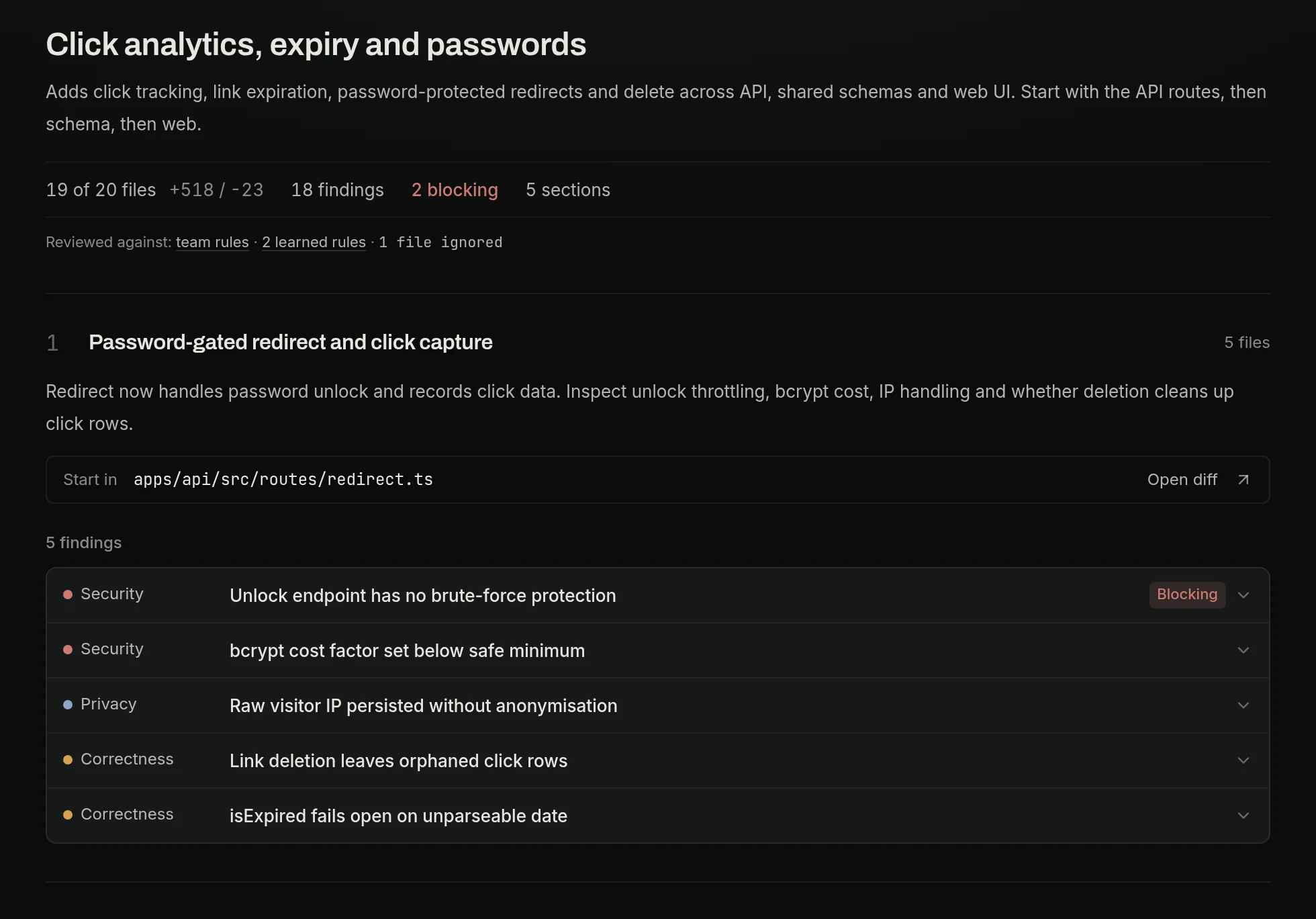
01Walkthrough
Start with the story, not the file list.
A summary of the whole change, then each part in the order to review it: what it does, the file to start in, and the findings that belong to it.
02Map
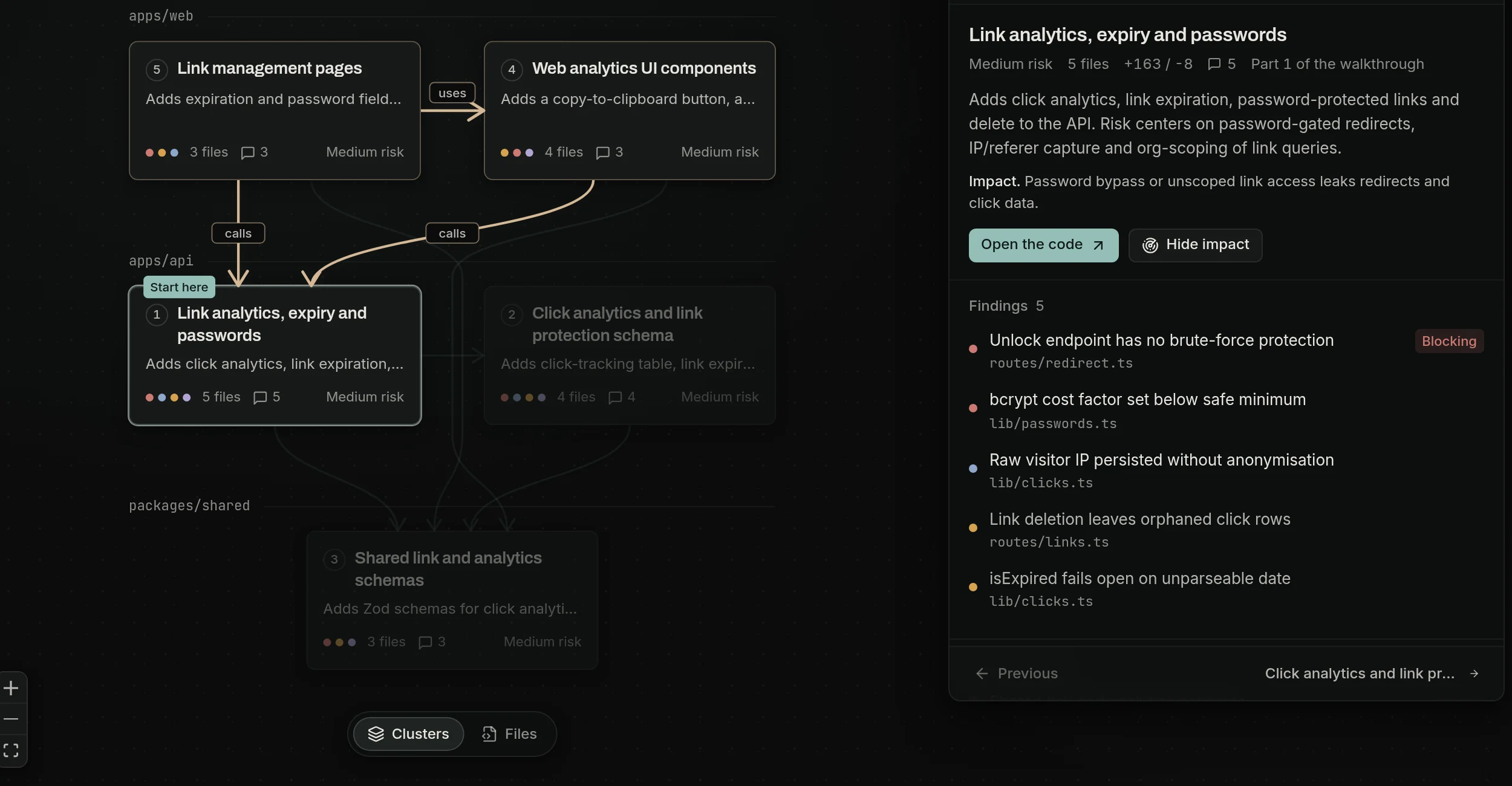
See what it touches before you read a line.
Parts laid out by area of the codebase, with what calls, uses and imports what. Select one to see its impact and the findings inside it.
03Findings
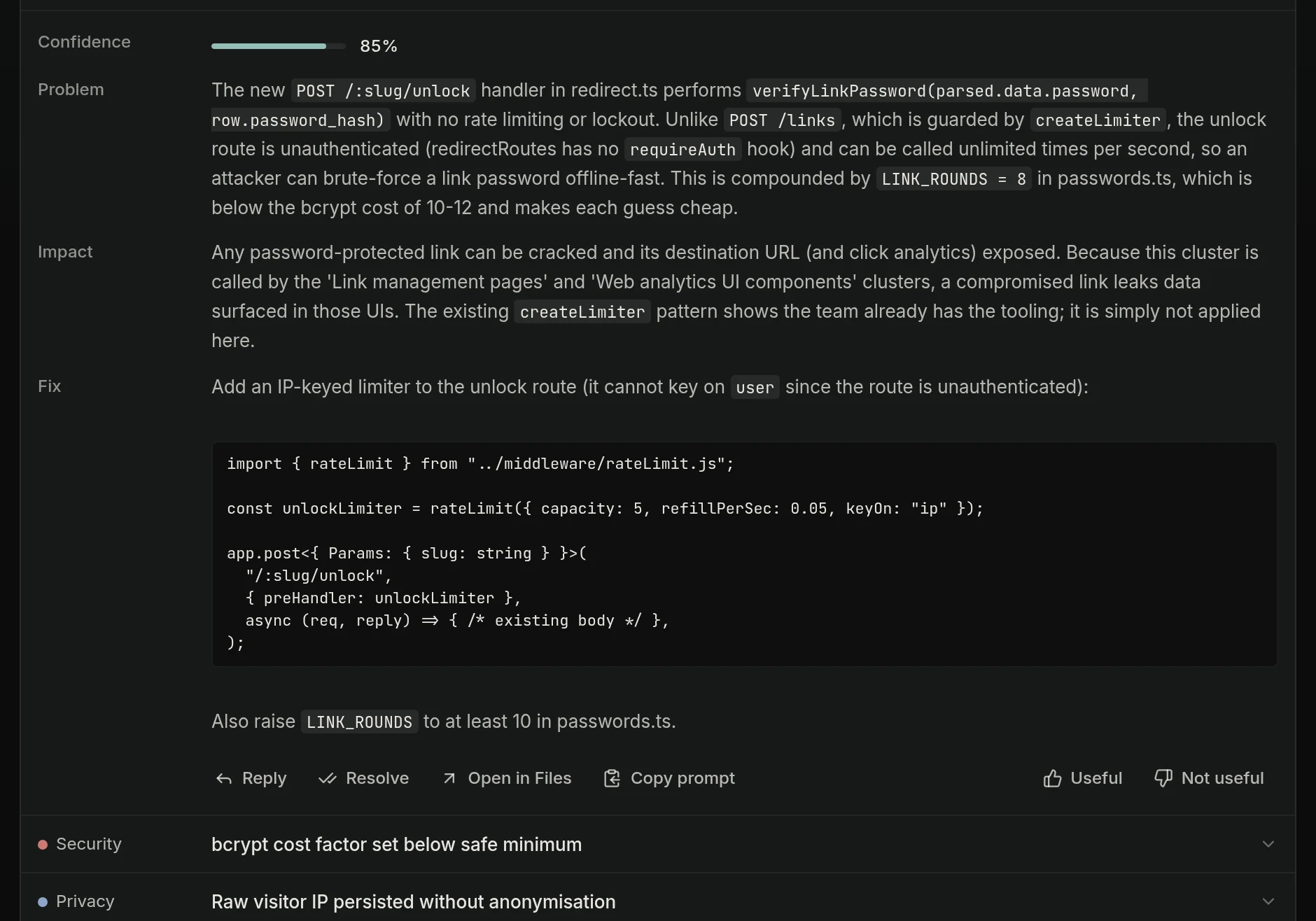
Findings that come with the fix.
Security, privacy, correctness, performance, architecture and tests. Each finding says what is wrong, what it breaks and how to fix it, with a confidence score. Blocking ones are marked.
04Files
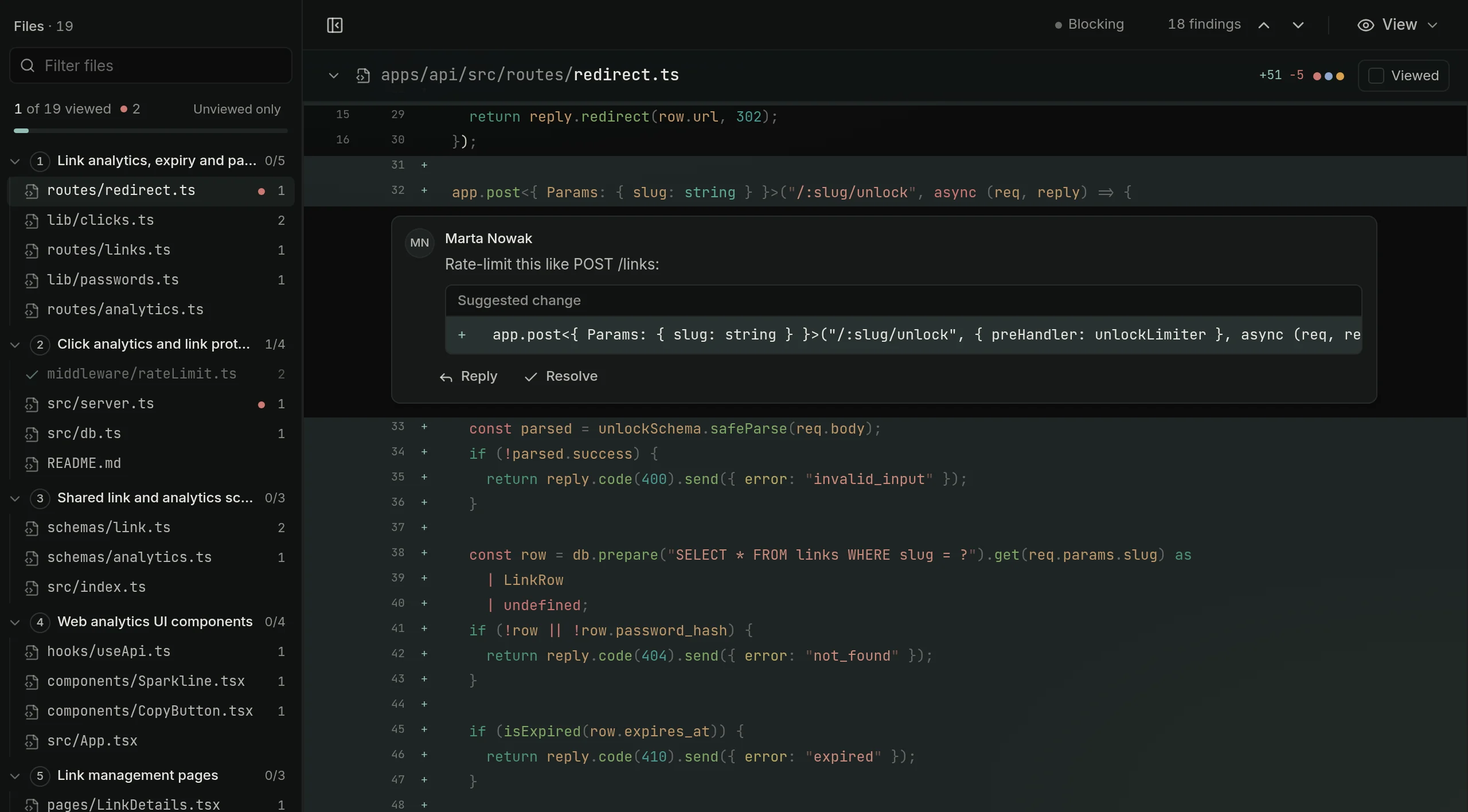
Then read the lines that matter.
Files grouped by part, in review order. Changed words are highlighted, viewed marks stick, and you can comment or suggest a change on any range of lines.
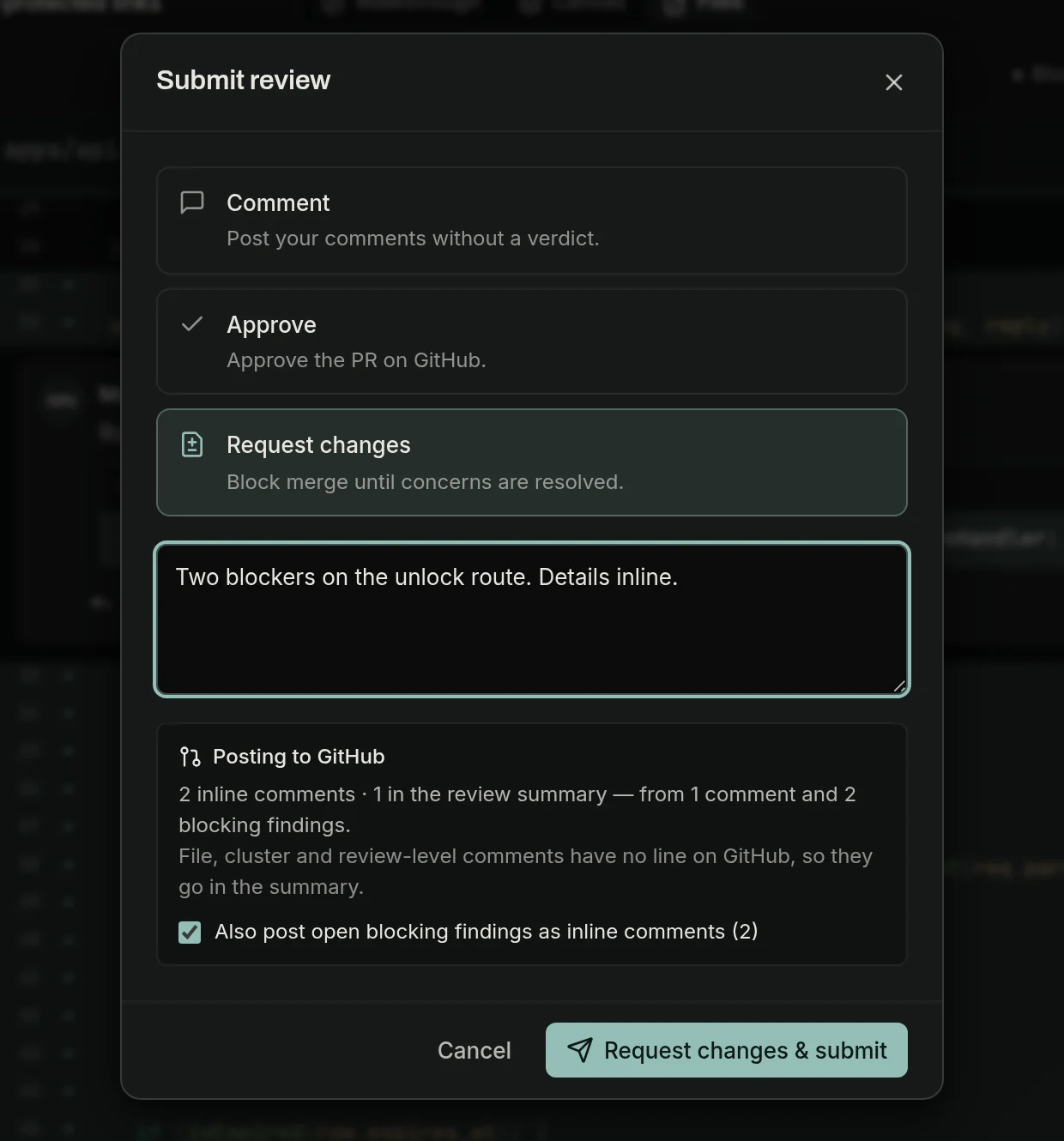
05Submit
One clean review back on GitHub.
Pick a verdict and Acuvis posts your comments and the blocking findings as a single GitHub review. A summary comment and a merge check keep the pull request current, and replies sync both ways.
Reviews that follow your team's rules.
Acuvis gets quieter and more specific the longer your team uses it.
- Team rules
- Write your standards once, in plain English. Every review checks the change against them.
- Repository guidelines
- Acuvis reads the rules your repository already keeps for coding agents: AGENTS.md, CLAUDE.md, CONTRIBUTING.md and Copilot instructions.
- Learned rules
- Dismiss a finding with “don’t flag this again” and it becomes a rule for your team. Admins can switch rules off.
- A merge check you control
- Report only, fail while blocking findings are open, or require an approval in Acuvis before merge.
- Fix prompts
- Pick findings and hand them to Claude Code, Cursor or any coding agent as one prompt.
- Slack and email
- Email for mentions, replies and reviews of your pull requests. A Slack channel for every review, or only the ones that need attention.
Your code, handled like it matters.
How we handle your code- Isolation
- Each pull request is analysed in its own Firecracker microVM, which is destroyed when the analysis finishes.
- What we keep
- The diff and the review, scoped to your organisation. Not your repository, not full files, not the clone.
- AI
- Inference through Fireworks AI and OpenAI under data processing terms: no training on your code. Fireworks keeps nothing; OpenAI keeps requests up to 30 days for abuse monitoring.
- Hosting
- Application data lives in the EU. Every sub-processor is listed, with where it runs.
- Audit
- Comments, resolutions and review events go into a per-organisation SHA-256 hash chain you can verify and export.
Pay for authors. Reviewers are free.
Re-reviewing a pull request never counts twice. Business adds a three-year audit log and priority support, and approved open-source projects review for free.
- 01 · Free, no card5pull requests
Install the GitHub App and Acuvis reviews your next five pull requests.
- 02 · Then a trial14days
Add a card to keep going for 14 days, up to 50 pull requests. Cancel before it ends and pay nothing.
- 03 · Then per author$17per developer / month
Billed annually, $21 monthly. You pay for developers who open pull requests. Reviewers and bots are free.
Questions
More in the FAQ, or write to hello@acuvis.dev.
How is Acuvis different from CodeRabbit or Greptile?
They leave AI comments on GitHub's diff. Acuvis gives you somewhere better to read the change: a walkthrough in review order, a map of what it touches and a Files view built for reviewing. You still get findings with fixes and a summary on the pull request, and your review goes back to GitHub as one review.
Does it replace reviewing on GitHub?
It replaces reading the diff there. The pull request, the merge button and the conversation stay on GitHub. Acuvis posts a summary comment and a merge check, sends your comments and verdict back as one GitHub review, and syncs replies both ways.
How does pricing work?
Your first five pull requests are free, then a 14-day trial. After that you pay per developer who opens pull requests: Team is $17 a month billed annually ($21 monthly), Business $34 ($42). Reviewers, viewers and bots are free, and Enterprise is custom.
What happens to our code?
Each pull request is analysed in its own Firecracker microVM that is destroyed afterwards. We keep the diff and the review, scoped to your organisation, and application data lives in the EU. Inference goes through Fireworks AI and OpenAI, neither of which trains on your code; Fireworks keeps nothing, OpenAI keeps requests for up to 30 days for abuse monitoring.
Is Acuvis free for open source?
Yes, on application. Approved public repositories get 200 free pull request reviews a month. Apply from the billing page after you install.
Your next pull request, as a walkthrough.
Sign in with GitHub or Google, install the app on a repository, and the next pull request opens in Acuvis. The first five are free.